How do you do the AI yearbook photo trend in 2026?
You can do the AI yearbook photo trend three ways in 2026, and they differ mostly in how many selfies you hand over and how long you wait. The apps that started the trend in autumn 2023 wanted a batch of selfies and a queue. One guide from that wave walks through picking 6 photos and waiting 20 minutes to an hour for a set of avatars.
Route two is a general image chatbot. Attach one selfie to Gemini or ChatGPT, paste a detailed prompt like the 5 below, and you get a yearbook photo in under a minute. The catch is the face: every attempt is a fresh drawing, so it looks like you on one try and like a cousin on the next.
Route three is a generator built to keep your face. Upload one selfie to the AI yearbook photo generator, pick the 90s yearbook look, and the portrait comes back in about 2 minutes with no model training and no batch upload. The rest of this article gives you the prompts for route two and explains why route three exists.
The 5 copy-paste 90s yearbook photo prompts for Gemini or ChatGPT
Attach one clear selfie, then paste one of these. Each names the backdrop, the two lights, the wardrobe and the print look, because a prompt that only says 90s yearbook gets you a random person in front of a random wall.
Prompt 1, laser backdrop yearbook portrait: Use the face in the uploaded photo exactly, same features, same skin, same proportions. 1991 American high school yearbook portrait, head and shoulders, body turned 45 degrees with the face turned back to camera, chin slightly down. Dark navy gradient backdrop with criss-crossing neon pink and blue laser lines. Stonewashed denim jacket over a white t-shirt, feathered hair with volume at the crown. One large soft studio flash from the front slightly above eye level, a hair light from behind giving a soft rim on the hair. Medium-format film look, soft skin, slightly warm colour, faint print grain, no modern sharpening.
Prompt 2, mottled blue muslin: Use the face in the uploaded photo exactly. 1996 school picture day portrait, head and shoulders, shoulders angled, gentle closed-mouth smile. Mottled blue-grey muslin backdrop, slightly out of focus but only a few feet behind. Plaid flannel shirt buttoned to the collar over a white t-shirt, hair parted in the middle. One big soft flash from the front, hair light from behind, flat even light with almost no shadow. Colour negative film look, matte finish, muted saturation, no HDR.
Prompt 3, mall glamour shot: Use the face in the uploaded photo exactly. 1992 mall glamour studio portrait, close head and shoulders, chin resting on one hand, looking just past the camera. Soft-focus filter over the whole frame, glowing highlights, oversized teased hair, denim jacket with the collar up, big earrings. Backlit hair light making a halo, soft frontal flash, pastel pink and blue gradient backdrop. Heavy diffusion, dreamy glow, 90s print look.
Prompt 4, 80s prom portrait: Use the face in the uploaded photo exactly. 1987 high school prom portrait in a hotel ballroom studio corner, three-quarter length, standing under a balloon arch with a foil star backdrop. Black tuxedo with a wide satin lapel and a boutonniere, or a shiny satin dress with puffed sleeves, matching the person in the photo. Two-light setup, soft front flash and a hair light, slightly overexposed skin, warm film colour, faint grain.
Prompt 5, Y2K digicam party: Use the face in the uploaded photo exactly. 2002 house party snapshot taken on a cheap compact digital camera with the flash on, harsh direct flash with a hard shadow on the wall behind, red-eye slightly corrected, low resolution with visible JPEG softness, baby tee and low-rise jeans or a striped polo, frosted tips or a zig-zag part, red plastic cup in hand, other people blurred at the edge of the frame.
These prompts cover four of the pack's 7 looks: the 90s yearbook portrait, the mall glamour shot, the 80s prom portrait and the Y2K digicam party. All 7, including the 2000s mirror selfie, the Polaroid snapshot and the 90s film street shot, are ready-made in the AI yearbook pack, so there is nothing to paste and the face is kept from your selfie.
What each prompt word does, and what breaks without it
Every prompt above carries the same six instructions. Drop one and a specific thing goes wrong, which is why the short 90s yearbook prompts copied from social captions rarely land.
| Prompt words | What they do | What breaks without them |
|---|---|---|
| Use the face in the uploaded photo exactly, first | Tells the model which face matters before it reads about hair | A smoother, younger, more symmetrical stranger under the big hair |
| An exact year, 1991 or 1996 | Pins the wardrobe and hair to one era | A blend of 1985 and 2005 in a single outfit |
| Laser grid or mottled blue-grey muslin backdrop | The one detail that makes it read as a school photo | A plain grey wall, or a plain modern studio white |
| One soft front flash plus a hair light | The flat, shadowless school-portrait light with a rim on the hair | Moody side light that reads as a 2020s headshot |
| Body turned 45 degrees, face back to camera, chin down | The pose every school photographer directed | A straight-on passport pose or a fashion lean |
| Film look, soft skin, faint grain, no sharpening | Kills the phone-camera crispness | Razor-sharp eyelashes and HDR skin that no 1994 print had |
What a real 90s school portrait studio actually did
The look you are copying was a production line, not a style choice, and knowing the recipe is what separates a convincing prompt from a costume. The neon laser backdrop came out of the 1980s, when many US schools used one national school photographer and its criss-cross grid of glowing lines became the default. The same backdrop is still sold to studios today: pink and blue beams on a dark blue gradient, printed on canvas or velvet.
By the mid 90s most schools had moved to a mottled blue-grey muslin, painted so it looked like clouds or marble. It hung only a few feet behind the stool, which is why it is soft but never the creamy blur a phone's portrait mode makes. A prompt that says bokeh gets the wrong decade.
The light was two sources and nothing else. One large umbrella or softbox sat just above the lens, giving flat, even, nearly shadowless light across the whole face. A second small light behind and above the head put a rim on the hair so it separated from the dark backdrop.
That halo on the hair is the single most missed detail in AI yearbook photos.
The pose was directed the same way for every student: sit on the stool, turn the body 45 degrees, bring the face back to the camera, chin down a touch, shoulders angled. Film was medium-format colour negative, printed matte, so skin looks soft and slightly warm and nothing in the frame is tack-sharp.
Your phone gets almost all of this wrong on its own. The wide front lens stretches the nose at selfie distance. HDR pulls detail out of the shadows the flash would have flattened, sharpening etches every eyelash, and portrait mode blurs the backdrop into mush.
That is why the prompts above spend as many words on light and print as on hair.
Why does the AI yearbook photo not look like you?
A general image chatbot does not place your face into a 90s scene. It redraws the whole frame, your face included, from its own idea of the person in the photo, and every attempt is a new drawing. That is why the same prompt gives you three slightly different people.
The yearbook look makes it worse than most scenes. Big feathered hair, a soft-focus filter and warm film colour all push the model toward its average 90s face, and the details that make you recognisable, the nose bridge, the jaw, the space between the eyes, get smoothed toward the mean. The result is a person who could plausibly be in your family.
A generator built for photos of you works the other way round. MakeAiPhotos starts from your selfie, keeps your features, and builds the backdrop, the light and the denim around them. Pick the 90s yearbook look in the AI yearbook photo generator and it comes back in about 2 minutes, with no model training and no batch of selfies.
If you want the checklist of what a selfie needs before you upload, it is in what photos to upload for the best AI photos.
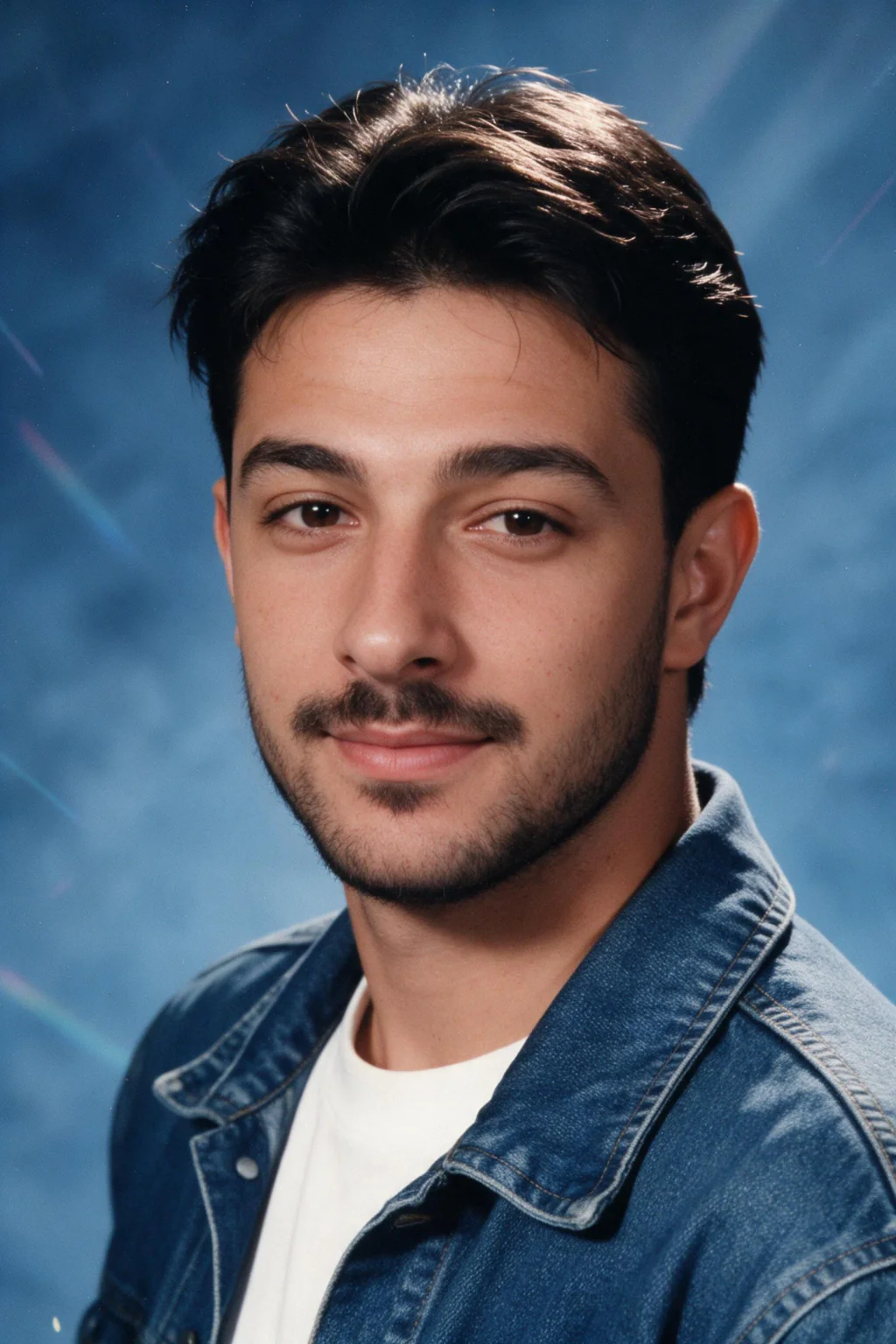
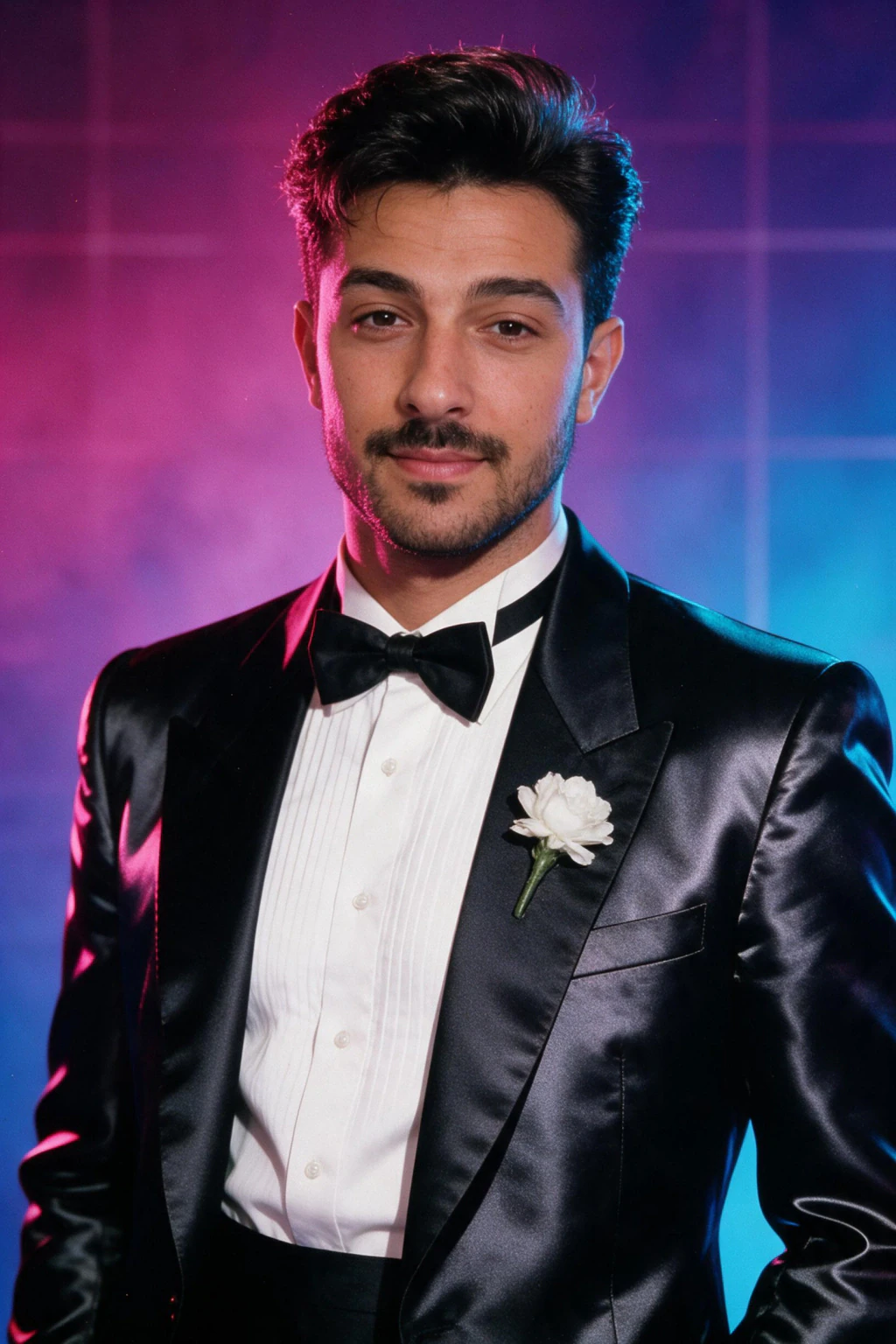
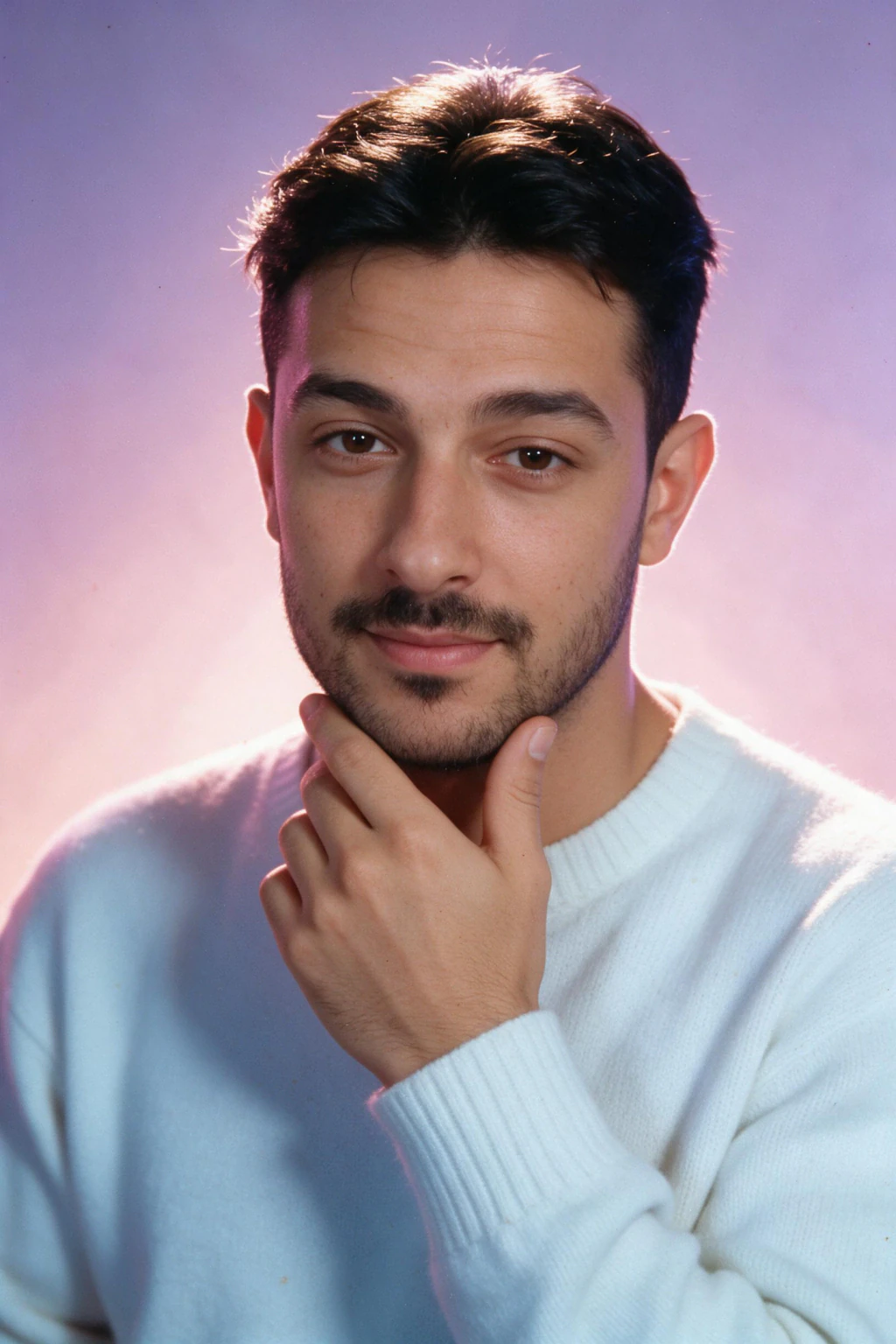
Same selfie, three retro looks
These three came from one phone selfie, run through the MakeAiPhotos looks built on the recipe above: named backdrop, two lights, directed pose, print look instead of phone crispness.

Which yearbook trend look should you post?
The pack has 7 looks, and they land differently. The 90s yearbook portrait is the one the trend is named after and the safest post for a wide audience. The 90s mall glamour shot and the 80s prom portrait get the biggest laugh in a group chat, because the hair does the work.
The Y2K digicam party and the 2000s mirror selfie are for anyone who was actually in school after 1999 and wants the version that matches their own memories. The Polaroid snapshot and the 90s film street shot are the quiet ones, closer to a real found photo than a costume, and they hold up as a profile picture. The AI Polaroid photo prompts post covers that look on its own.
One upload covers all 7. $14.99 buys about 15 photos at about 2 minutes each, with a 14-day money-back guarantee, so you can run the yearbook portrait and a couple of the others from the same selfie and post the one that lands.
Can people tell a yearbook photo is AI?
They can when the prompt skipped the recipe. The giveaways are consistent: hair that is voluminous but too neat, teeth whitened to a 2020s standard, a laser backdrop where the lines cross in ways a printed backdrop never did, modern moody side light instead of the flat flash, and skin so sharp you can count pores on what should be a matte print.
A convincing one has the hair-light halo, a slightly soft face, a backdrop that is close and only gently out of focus, a directed 45-degree pose, and colour that leans warm and a little faded. The full list of realism checks, for any AI photo, is in how to make AI photos look realistic.
Frequently Asked Questions
- How do you do the AI yearbook photo trend?
- Upload a selfie to a generator that makes 90s school portraits, pick the yearbook look, and post the result. The 2023 apps needed 6 or more selfies and a wait of 20 minutes to an hour. In 2026, MakeAiPhotos does it from one selfie in about 2 minutes, or you can paste a detailed prompt into Gemini or ChatGPT.
- What is the best AI yearbook prompt for Gemini?
- The best one starts with an instruction to use the exact face from your photo, then names an exact year, a laser grid or mottled blue-grey muslin backdrop, one soft front flash plus a hair light, a 45-degree pose with the chin down, denim or a collared shirt, and a soft film print look with no modern sharpening.
- How many selfies do you need for AI yearbook photos?
- One, if the generator is built to keep your face. MakeAiPhotos makes the yearbook portrait from a single clear selfie in about 2 minutes with no model training. The apps behind the original trend asked for 6 or more selfies and made you wait 20 minutes to an hour before you saw anything.
- Why doesn't my AI yearbook photo look like me?
- Because a general chatbot redraws your whole face instead of keeping it, and the big hair, soft-focus glow and warm film colour pull it toward an average 90s face. Use a sharp front-facing selfie, put the face instruction first in the prompt, and try a generator that keeps your features and changes only the scene.
- Is the AI yearbook trend still a thing in 2026?
- Yes, but it moved. The 2023 wave was one app and a batch of selfies. In 2026 people run the look through Gemini or ChatGPT prompts, or through one-selfie generators, and the retro set has widened to mall glamour shots, 80s prom portraits, Y2K digicam party photos and Polaroids alongside the original 90s yearbook portrait.
- What background did 90s yearbook photos use?
- Two backdrops cover almost every 90s school portrait. The neon laser grid, pink and blue beams crossing a dark blue gradient, dates from the 1980s and ran into the early 90s. The mottled blue-grey muslin, painted to look like clouds or marble, took over by the mid 90s and hung only a few feet behind the stool.