The 6 AI Polaroid photo prompts for Gemini and ChatGPT
How to make an AI Polaroid photo with a chatbot: attach one clear selfie, then paste one of these. Each is written for Gemini or ChatGPT and names the print, the flash, the color and the pose.
A prompt that only says Polaroid gets you a clean digital portrait inside a white rectangle with a wordmark on it.
Prompt 1, flash in a dim room: Use the face in the uploaded photo exactly. An instant-film print with a thick white border and a deeper bottom edge, no brand name on the frame. One direct on-camera flash in a dim living room at night, bright on the face and falling off into a dark background, faded warm color, slightly lifted blacks, fine film grain, candid half-smile caught mid-sentence, plain dark t-shirt, chest-up framing with the face large.
Prompt 2, white curtain: Use the face in the uploaded photo exactly. An instant-film print with a thick white border and a deeper bottom edge, no brand name on the frame. Standing in front of a plain white curtain, direct flash throwing a soft shadow onto the curtain behind, slightly overexposed skin, faded warm tones, fine grain, relaxed candid pose looking just off camera, chest-up framing with the face large.
Prompt 3, party snapshot: Use the face in the uploaded photo exactly. An instant-film print with a thick white border and a deeper bottom edge, no brand name on the frame. A crowded house party at night, direct flash freezing the face while the room behind goes dark and warm, red-eye left in, faded color, fine grain, laughing mid-moment with a drink held out of frame, chest-up framing with the face large.
Prompt 4, car window: Use the face in the uploaded photo exactly. An instant-film print with a thick white border and a deeper bottom edge, no brand name on the frame. Sitting in the passenger seat of a car at dusk, flash bouncing off the window at the edge of the frame, faded warm color, slight blue cast in the shadows, fine grain, candid glance at the camera, chest-up framing with the face large.
Prompt 5, beach at golden hour: Use the face in the uploaded photo exactly. An instant-film print with a thick white border and a deeper bottom edge, no brand name on the frame. On a beach at golden hour with the sun low behind, a weak on-camera fill flash against the low sun, washed-out warm highlights, soft contrast, faded color, fine grain, hair blowing, unposed smile, chest-up framing with the face large.
Prompt 6, kitchen at night: Use the face in the uploaded photo exactly. An instant-film print with a thick white border and a deeper bottom edge, no brand name on the frame. Leaning on a kitchen counter at night, direct flash, cabinets falling into shadow behind, faded warm color, fine grain, caught mid-laugh, plain sweatshirt, chest-up framing with the face large.
What each prompt word does, and what breaks without it
Every prompt above carries the same six instructions. Drop one and a specific thing goes wrong, which is why short prompts copied from social posts rarely land.
| Prompt words | What they do | What breaks without them |
|---|---|---|
| Instant-film print, thick white border, deeper bottom edge | The frame geometry of a real print | A digital photo with an even thin border, or no border at all |
| No brand name on the frame | Keeps the border blank | A wordmark or logo printed on the bottom border |
| One direct flash, falling off into a dark background | The light every night snapshot has | Soft even studio light that reads as a phone portrait mode |
| Faded warm color, lifted blacks, fine grain | The look of the dye chemistry | Clean saturated color and pure black, which no instant print has |
| Candid, caught mid-moment | A snapshot instead of a portrait | A stiff studio smile that looks like a filter |
| Use the face in the uploaded photo exactly | Tells the model which face matters | A slimmer, smoother, younger stranger |
Why does Gemini or ChatGPT change your face in a Polaroid prompt?
A general image chatbot does not paste your face into a print. It redraws the whole frame, your face included, from its own idea of the person in your photo.
Every attempt is a new drawing, so the likeness moves a little each time. The two-photo version of the AI Polaroid trend, where a second person is added to the frame, moves it further.
Instant film makes it worse than most looks. The prompt asks for blur, grain, fade and a hard flash, and every one of those gives the model permission to soften the details that make your face yours. The result is a pleasant, slightly younger person who is not quite you.
A generator built for photos of you works the other way round. MakeAiPhotos starts from your selfie, keeps your features, and builds the print, the flash and the grain around them. Pick the Polaroid snapshot look in the AI yearbook and retro photo generator and it comes back in about 2 minutes with no model training.
One honest limit: that look is single subject. For two people in one print you need a chatbot with both photos attached, and you accept the drift.
Same selfie, three retro looks
These three came from one phone selfie through the MakeAiPhotos looks, which follow the same rules as the prompts above: real print geometry, a light source a real camera would have, and a face that stays put.

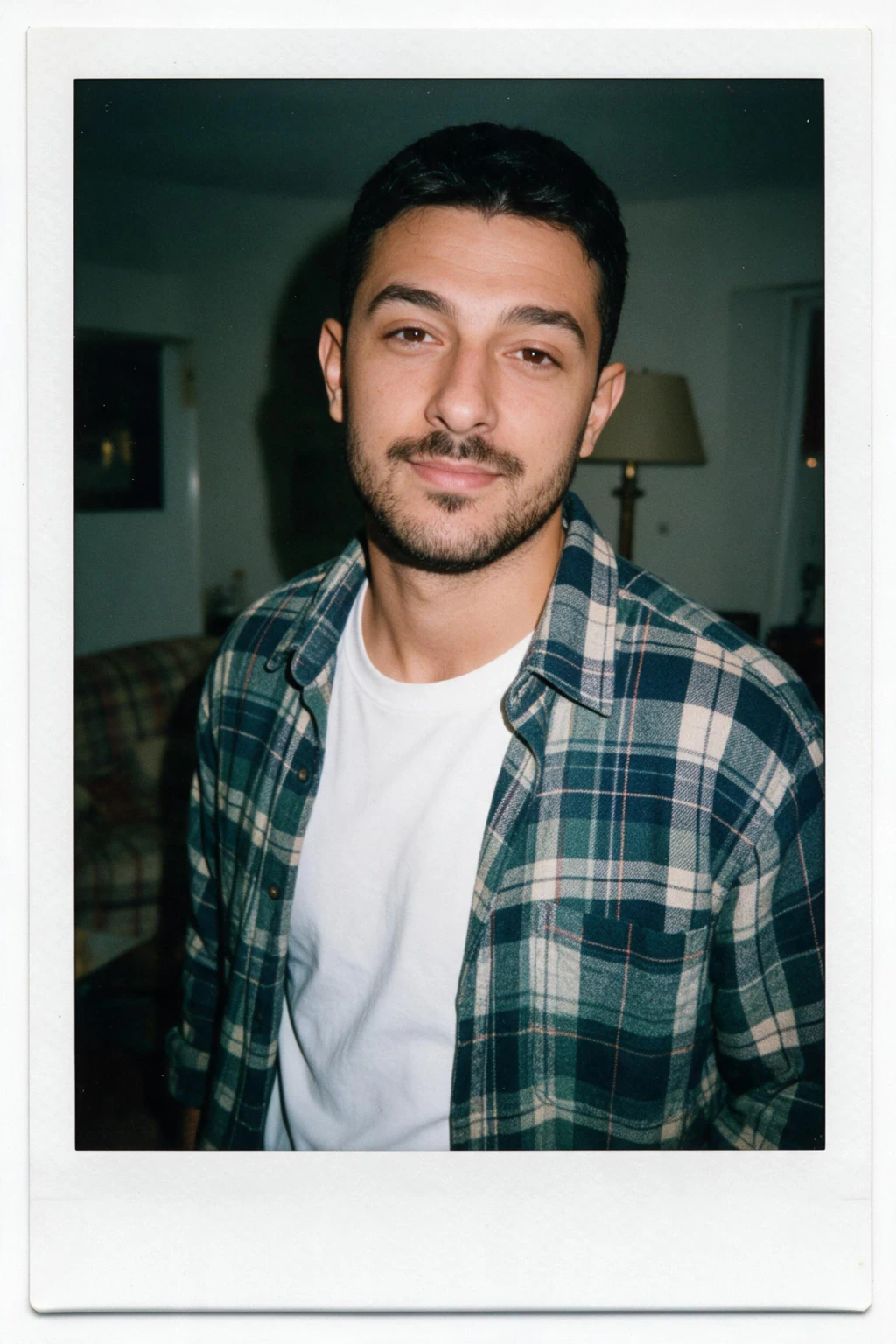
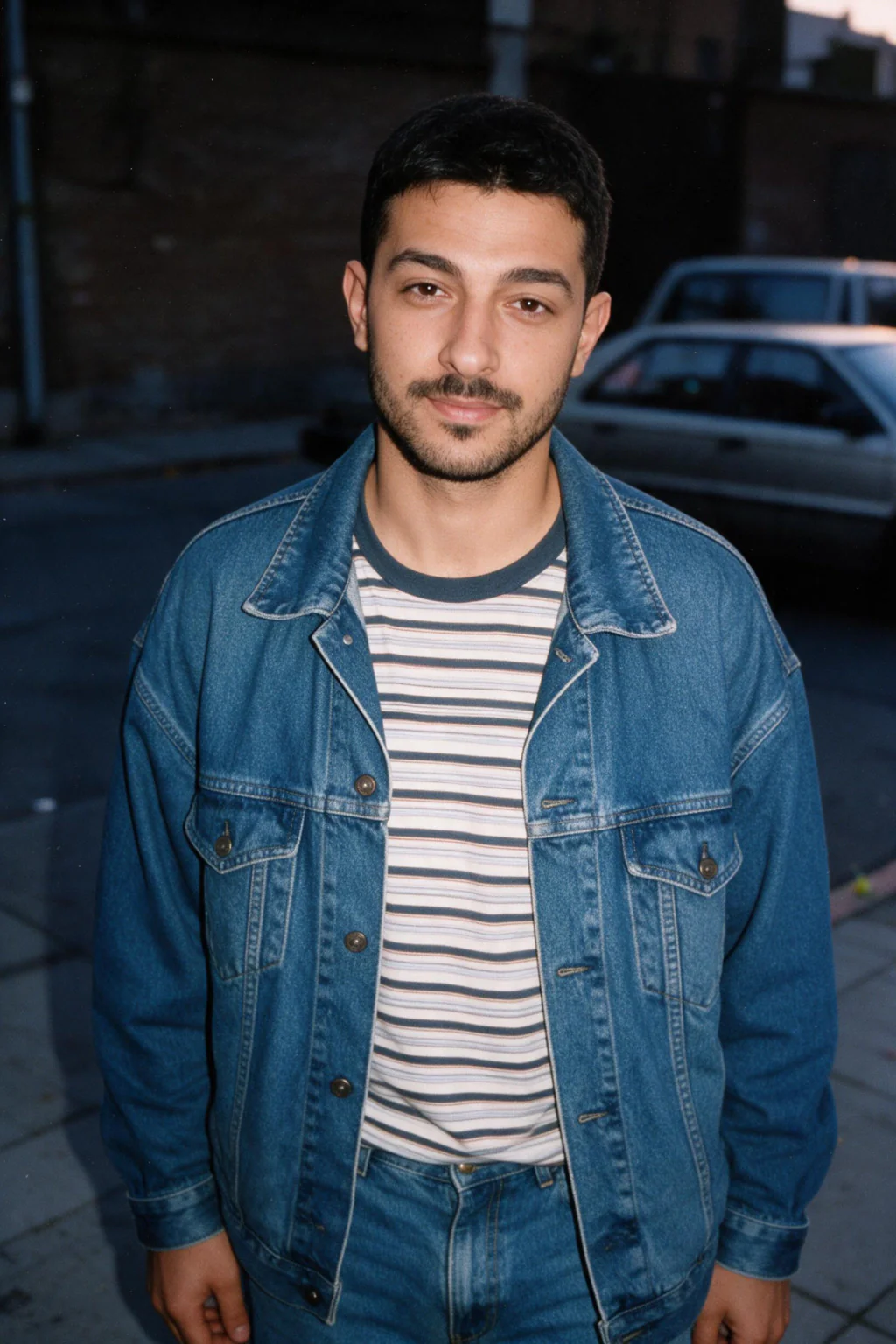
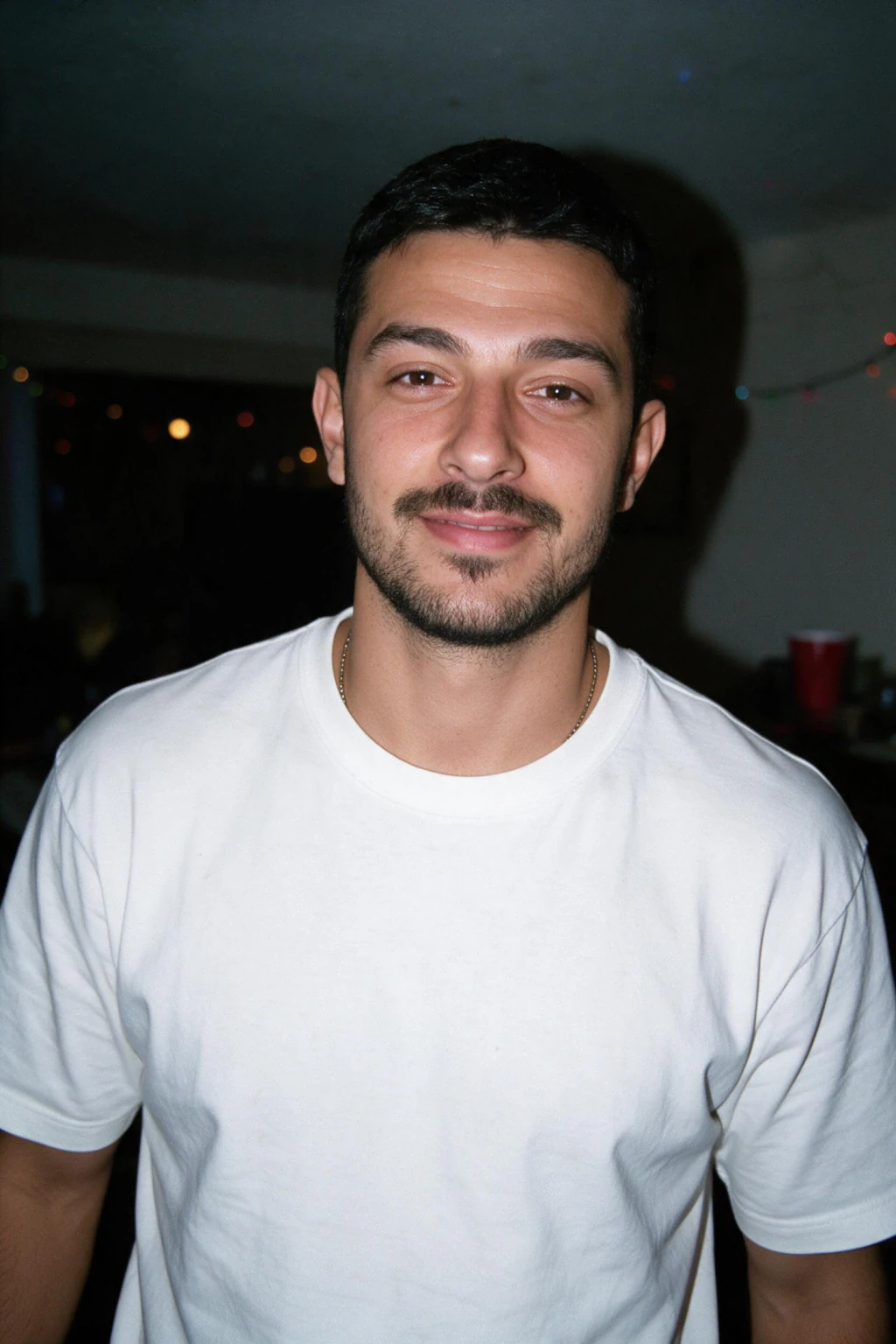
What does a real instant print look like, and why do vintage filters get it wrong?
Start with the frame. A classic Polaroid 600 print measures 3.5 by 4.2 inches, with a 3.1 inch square image inside it. That leaves about 0.2 inches of border on each side and just over an inch to split between top and bottom, and the bottom takes most of it.
A print with equal borders on all four sides is the first tell of a filter.
Then the light. A real instant camera fires a small flash from a few inches beside the lens, so the face is bright, the wall two feet behind is dimmer, and the far end of the room is nearly black.
Filter apps tint the whole image evenly and never darken the background, which is why their output looks like a phone photo wearing a costume.
Then the color. Instant film is developed by chemistry that runs at room temperature, and the temperature shows in the print. Developed too cold, a print comes out blue-tinted and desaturated; too warm, it goes orange or pink, with the sweet spot between 55 and 82 degrees Fahrenheit.
Real prints drift in one direction or the other, so ask for warm skin with a slight cool drift in the shadows, not a uniform sepia wash.
Last, the surface. Real prints have a slight sheen, soft edges where the developer reagent spread unevenly, and blacks that never go fully black.
When you prompt, ask for lifted blacks and a soft flash shadow on the wall. Skip the fake scratches and light leaks, which appear on almost every filter output and almost no real print.
Yearbook, digicam and mirror-selfie prompts on the same rules
The Polaroid rules carry over to every retro look: name the medium, name the one light source a real camera had, name the color the process produced, and keep the pose candid.
90s yearbook portrait: Use the face in the uploaded photo exactly. A 1990s school yearbook portrait on a mottled blue-grey studio backdrop, one softbox from the front left, slight lens softness, warm film color, plain collared shirt, small closed-mouth smile, head-and-shoulders framing with the face large.
Y2K digicam party: Use the face in the uploaded photo exactly. An early-2000s compact digital camera photo at a house party, hard direct flash, dark room, slight overexposure on the skin, mild color noise, low-resolution look, caught mid-laugh, chest-up framing with the face large.
2000s mirror selfie: Use the face in the uploaded photo exactly. A 2000s bathroom mirror selfie on a flip phone, flash reflected as a bright spot in the mirror, soft focus, low resolution, warm cast, plain hoodie, casual pose, chest-up framing with the face large.
All three, plus the 90s mall glamour shot, 80s prom portrait, 90s film street shot and the Polaroid snapshot, are the 7 ready-made looks on the AI yearbook and retro photo page, so there is nothing to paste.
What gives an AI Polaroid photo away?
They can when the prompt skipped the details above. The giveaways are consistent: a brand wordmark on the border, equal borders on all four sides, a background as bright as the face, pure black shadows, a posed studio smile, and skin smoother than any flash has ever made it.
A convincing Polaroid AI photo shows a deeper bottom border, a face lit harder than the wall behind it, a soft flash shadow, warm skin with a faint blue drift in the shadows, fine grain, and a pose nobody planned. Skin texture matters too. The full list of realism checks is in how to make AI photos look realistic.
The other half is the selfie you start from. A sharp, front-facing, unfiltered photo gives any generator more of your face to keep. What photos to upload for the best AI photos covers the selfie that works and the four that quietly fail.
Frequently Asked Questions
- Can Gemini make a Polaroid photo of me?
- Yes, if you attach a clear selfie and use a detailed prompt like the six above. Expect the face to drift between attempts, because a general chatbot redraws it each time. If your face keeps changing, a one-selfie generator such as MakeAiPhotos keeps your features and takes about 2 minutes per photo.
- What is the best Gemini Polaroid prompt?
- The best one names the print, the light and the color: an instant-film print with a thick white border and a deeper bottom edge, no brand name on the frame, one direct flash falling off into a dark background, faded warm color with fine grain, a candid pose, and an instruction to keep the exact face from your photo.
- Why doesn't my AI Polaroid photo look like me?
- The chatbot redraws your whole face instead of keeping it, and the blur, grain and fade you asked for give it room to soften your features. Use a sharp front-facing selfie, ask it to keep the face exactly, and try a generator built to keep your face, which changes only the scene.
- Why does the AI print a brand name on the Polaroid border?
- Because the word Polaroid in a prompt is also a brand, and image models learned that border with the wordmark printed on it, so they draw it back in. Ask for an instant-film print with a thick white border and say no brand name on the frame. The six prompts above are written that way.
- How do I make an AI Polaroid photo of myself without a chatbot?
- Upload one clear selfie to MakeAiPhotos, pick the Polaroid snapshot look, and the photo comes back in about 2 minutes with your face kept. There is no model training. $14.99 covers about 15 photos, so the same selfie can also become a 90s yearbook portrait or a Y2K digicam shot.
- Can people tell a Polaroid photo is AI?
- Often, when the border carries a wordmark, all four borders are equal, the background is as bright as the face, or the shadows are pure black. A convincing one has a deeper bottom border, hard flash falloff, warm faded color, fine grain and a candid pose. Keep the result that looks like you.